Restaurant reviews that win more good ones and catch the bad ones first
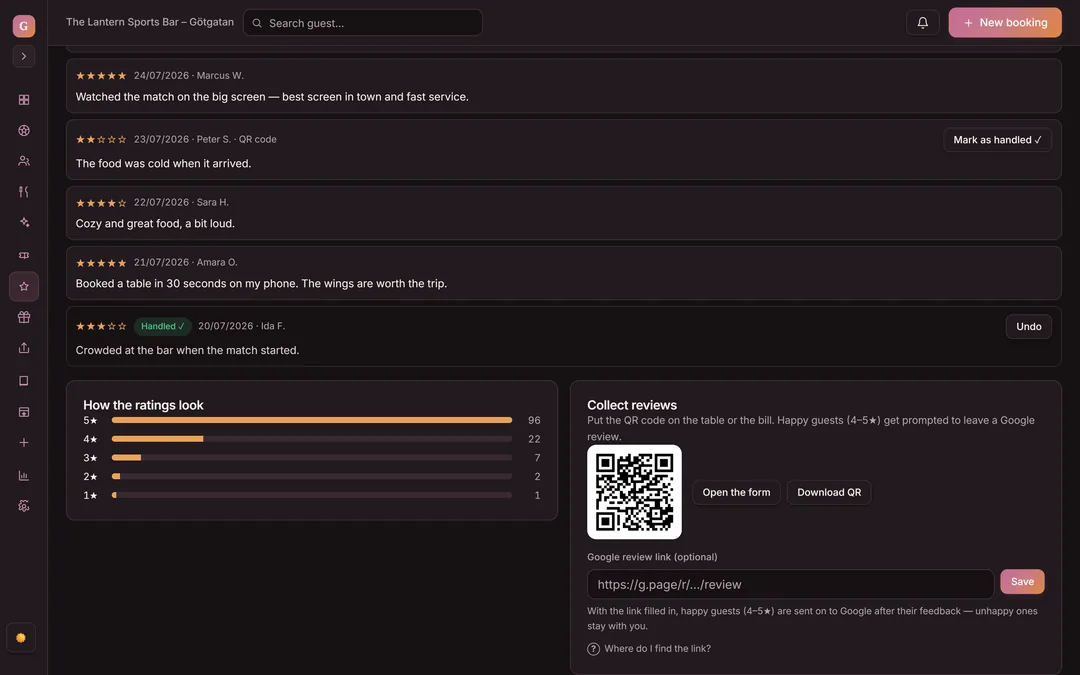
Restaurant reviews are guest ratings left after a visit. The guest leaves a rating after the meal — 4-5 stars lead on to Google, lower ratings stay private with you first. You see the average, the reply count, and the breakdown in the dashboard.
- Rate after the visit
- No charge per review
- Average and breakdown in the dashboard
- Rate after the meal
- QR at the table
- Route to Google
- Private for low ratings
- Average and breakdown
- All in the dashboard
Leave a rating — and see where it goes
This is the guest's view after the visit, with the same switch as in the product. At 4-5 stars the guest gets a one-tap path to your Google page. At 3 stars or lower the response stays private with you, in time to fix the issue.
- The guest scans the QR code on the table or the check and rates you on their phone — no app.
- At 4-5 stars, a one-tap path to your Google page opens.
- At 3 stars or lower, the response stays private with you — nothing is sent to Google.
- The review counts into the average and the breakdown in the dashboard, and low ratings collect under Needs action (≤3★).
How was your visit?
Tap a star — you'll see right away where the review goes.
Thanks for your feedback!
Share it on Google ↗Thank you for telling us directly — the owner reads every reply.
- The guest got the Google button — the review can go public and lift your average rating.
- The rating counts into the average and the breakdown in your dashboard.
- Nothing is sent to Google — the response stays private with you.
- The review lands under Needs action (≤3★) in the dashboard, so you can reach out the same day.
How does the guest leave a review?
The guest scans a QR code on the table or the check, or opens a link, and leaves a rating right on their phone. Ask while the meal and the service are still fresh and you get more replies.
- QR code on the table or check
- A rating in seconds, no app
- Automatic request two hours after a reserved visit
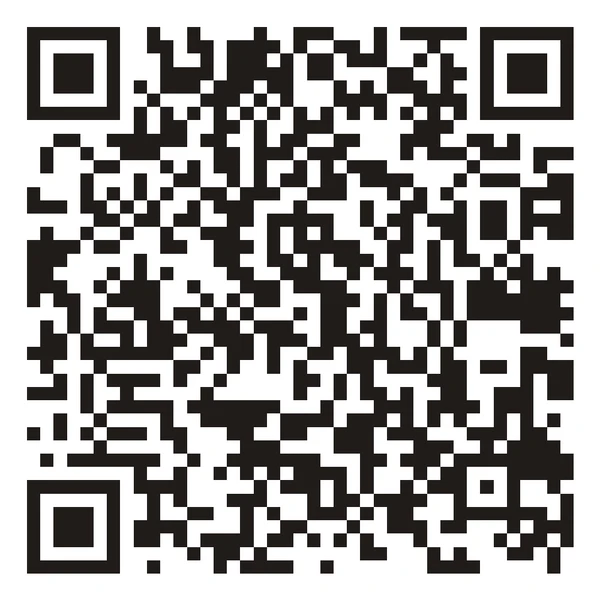 Scan with your phone A real QR code — it opens the rating demo on this page, just like the guest's code on the table opens the rating question.
 From the table to Google — step by step
Click a step to see what data is created and what happens next. Every step is live in the product today.
-
You print the QR code from the dashboard and put it on the table or the check. The guest scans it with their phone camera and lands straight in the rating question.
-
The guest picks 1-5 stars and can leave a comment and their name — everything is optional except the stars. Takes a couple of seconds.
-
At 4-5 stars the guest gets a one-tap path to your Google page. At 3 stars or lower no Google link is ever shown — the response goes only to you.
-
The review counts into the average rating and the breakdown. Low ratings collect under the Needs action (≤3★) filter, so you see right away which guests to reach out to.
-
Two hours after a reserved visit is marked finished, Goboblo sends the guest the rating question by email. For walk-in guests, use the QR code or a link.
What does the reviews dashboard show?
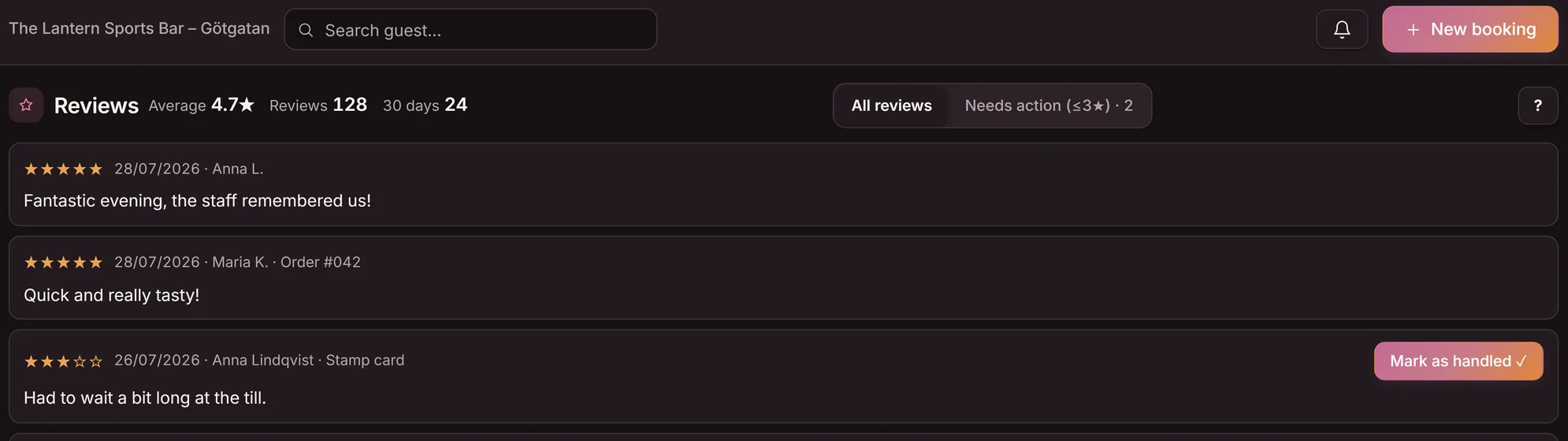
The dashboard shows your average rating, how many guests replied, and how the ratings break down. Low ratings collect under the Needs action (≤3★) filter, so you know where you stand without tallying reviews by hand.
- Average rating and reply count
- Breakdown from 5 stars down to low ratings
- The Needs action (≤3★) filter collects low ratings
- The name the guest leaves, on each review
Two responses, two paths
The same question goes out to every guest. The rating picks the path: the happy review out into the light on Google, the sour one in privately with you, in time to fix it.
- Sour reviews land straight on Google
- You see the complaint after everyone else has
- Happy guests forget to leave a review
- You tally the ratings by hand
- Low ratings kept private before they go public
- You reach out the same day and fix the issue
- Happy guests led to Google with one tap
- Average, count and breakdown in the dashboard
Reviews at no extra charge
What operators ask
What is a restaurant review system?
A restaurant review system collects guest ratings after the visit and decides where they land. In Goboblo the guest rates you via a QR code or a link, happy guests are routed to Google, and low ratings stay private with you. You see the average and the breakdown in the dashboard.
How does Goboblo route happy guests to Google?
The guest leaves a rating after the visit. At 4 or 5 stars, they get a one-tap path to your Google page, lifting your average rating. At 3 stars or lower, the response stays private with you first, so you can fix the issue before it goes public.
Is it gaming the system to ask for reviews?
No. You ask every guest for honest feedback, not only the happy ones. Goboblo routes where the review goes, not what the guest thinks. You collect the positives in public on Google and the negatives in private, fully within Google's guidelines for genuine reviews.
How does Goboblo ask the guest for a review?
The guest scans a QR code on the table or the check, or opens a link, and leaves a rating on their phone in a couple of seconds, no app. Ask while the meal and the service are still fresh and you get more replies. Guests who reserved also get the question automatically, by email, two hours after the visit is marked finished in Goboblo.
What do I do with a negative review?
At 3 stars or lower the review stays private with you, so it never goes on to Google. You see it under the Needs action (≤3★) filter in the dashboard and can call or email the guest the same day, before they post. The list shows the name the guest leaves; the review is not added to the guest profile.
What do restaurant reviews cost in Goboblo?
Reviews are part of the restaurant loyalty software, and it's free until 150 guests use the digital stamp card for restaurants. Every guest who uses the card counts, and keeps counting — the number only grows. Every review you collect is free, and there's 0 commission on your own reservations. See what reviews cost.
Lift your rating and catch complaints in time
Book a short demo and we'll show how the guest rates you after the meal, how happy guests reach Google, and how low ratings stay private with you.