Restaurant cancellation policy
A cancellation policy is the set of rules for how and when a guest can cancel without leaving you with an empty table. A clear policy gets more guests to tell you in time — so you can fill the table with someone else.
- A template to build and copy
- Cancellation window per location
- Guests cancel on their own, in time
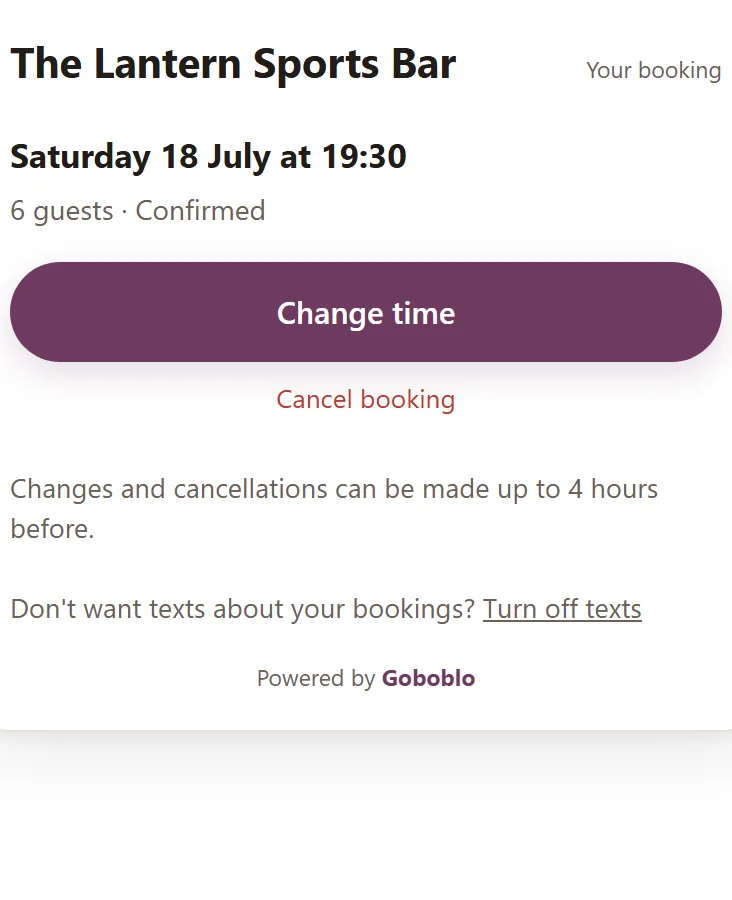
A restaurant cancellation policy is the set of rules for how and when a guest can cancel a reservation without leaving you with an empty table. It says how far ahead the guest can cancel on their own, what happens when they cancel late, and what counts as a missed reservation. Most empty tables are not down to bad intentions — the guest forgets, something comes up, or they simply don't know how to cancel. A policy that is easy to read and easy to follow solves most of that, before the table sits empty.
Build your policy — and copy it
Pick a cancellation window and whether you want the card cover, and the generator builds a finished policy text. Copy it, fill in the parts in brackets, and put it on your reservation page and in your confirmation email. Keep it short — a guest should understand it in three seconds.
- Pick a window: 4 hours fits lunch and weeknights, 1 day fits weekend nights, 2 days fits fine dining and tasting menus.
- Pick a card-cover mode: no card required, a card for large parties, or a card for repeat no-showers too.
- Copy the text and swap the brackets — restaurant name, phone number, party size and amount.
Cancellation policy — [Restaurant name]

- You can change or cancel your reservation yourself using the link in your confirmation, up to 4 hours before your time.
- If you cancel later than 4 hours before, please call us on [phone number] so we can offer the table to someone else.
- Parties of [number] or more may have separate terms — these are shown in your confirmation.
- If you don't arrive and don't cancel, it counts as a missed reservation.
- We'll send you a reminder by email before your visit, so you have time to change your plans if something comes up.
Cancellation policy — [Restaurant name]
- You can change or cancel your reservation yourself using the link in your confirmation, up to 4 hours before your time.
- If you cancel later than 4 hours before, please call us on [phone number] so we can offer the table to someone else.
- Parties of [number] or more are asked to save a card when booking. Nothing is charged when the reservation is made — a fee of [amount] per guest applies only if the party doesn't arrive and doesn't cancel.
- If you don't arrive and don't cancel, it counts as a missed reservation.
- We'll send you a reminder by email before your visit, so you have time to change your plans if something comes up.Cancellation policy — [Restaurant name]
- You can change or cancel your reservation yourself using the link in your confirmation, up to 4 hours before your time.
- If you cancel later than 4 hours before, please call us on [phone number] so we can offer the table to someone else.
- Parties of [number] or more are asked to save a card when booking. Nothing is charged when the reservation is made — a fee of [amount] per guest applies only if the party doesn't arrive and doesn't cancel.
- If you've previously missed a reservation without canceling, we may ask you to save a card regardless of party size.
- If you don't arrive and don't cancel, it counts as a missed reservation.
- We'll send you a reminder by email before your visit, so you have time to change your plans if something comes up.Cancellation policy — [Restaurant name]
- You can change or cancel your reservation yourself using the link in your confirmation, up to 1 day before your time.
- If you cancel later than 1 day before, please call us on [phone number] so we can offer the table to someone else.
- Parties of [number] or more may have separate terms — these are shown in your confirmation.
- If you don't arrive and don't cancel, it counts as a missed reservation.
- We'll send you a reminder by email before your visit, so you have time to change your plans if something comes up.Cancellation policy — [Restaurant name]
- You can change or cancel your reservation yourself using the link in your confirmation, up to 1 day before your time.
- If you cancel later than 1 day before, please call us on [phone number] so we can offer the table to someone else.
- Parties of [number] or more are asked to save a card when booking. Nothing is charged when the reservation is made — a fee of [amount] per guest applies only if the party doesn't arrive and doesn't cancel.
- If you don't arrive and don't cancel, it counts as a missed reservation.
- We'll send you a reminder by email before your visit, so you have time to change your plans if something comes up.Cancellation policy — [Restaurant name]
- You can change or cancel your reservation yourself using the link in your confirmation, up to 1 day before your time.
- If you cancel later than 1 day before, please call us on [phone number] so we can offer the table to someone else.
- Parties of [number] or more are asked to save a card when booking. Nothing is charged when the reservation is made — a fee of [amount] per guest applies only if the party doesn't arrive and doesn't cancel.
- If you've previously missed a reservation without canceling, we may ask you to save a card regardless of party size.
- If you don't arrive and don't cancel, it counts as a missed reservation.
- We'll send you a reminder by email before your visit, so you have time to change your plans if something comes up.Cancellation policy — [Restaurant name]
- You can change or cancel your reservation yourself using the link in your confirmation, up to 2 days before your time.
- If you cancel later than 2 days before, please call us on [phone number] so we can offer the table to someone else.
- Parties of [number] or more may have separate terms — these are shown in your confirmation.
- If you don't arrive and don't cancel, it counts as a missed reservation.
- We'll send you a reminder by email before your visit, so you have time to change your plans if something comes up.Cancellation policy — [Restaurant name]
- You can change or cancel your reservation yourself using the link in your confirmation, up to 2 days before your time.
- If you cancel later than 2 days before, please call us on [phone number] so we can offer the table to someone else.
- Parties of [number] or more are asked to save a card when booking. Nothing is charged when the reservation is made — a fee of [amount] per guest applies only if the party doesn't arrive and doesn't cancel.
- If you don't arrive and don't cancel, it counts as a missed reservation.
- We'll send you a reminder by email before your visit, so you have time to change your plans if something comes up.Cancellation policy — [Restaurant name]
- You can change or cancel your reservation yourself using the link in your confirmation, up to 2 days before your time.
- If you cancel later than 2 days before, please call us on [phone number] so we can offer the table to someone else.
- Parties of [number] or more are asked to save a card when booking. Nothing is charged when the reservation is made — a fee of [amount] per guest applies only if the party doesn't arrive and doesn't cancel.
- If you've previously missed a reservation without canceling, we may ask you to save a card regardless of party size.
- If you don't arrive and don't cancel, it counts as a missed reservation.
- We'll send you a reminder by email before your visit, so you have time to change your plans if something comes up.You fill in the brackets yourself. The card-cover lines require the no-show cover to be switched on in Goboblo: the guest saves a card when booking, nothing is charged when the reservation is made, and the fee applies only if the party doesn't arrive and doesn't cancel.
Set a window that fits your restaurant
The cancellation window is how far ahead a guest can cancel on their own without calling. It's the heart of the policy. In Goboblo you set the window per location yourself, as a setting — if you run both a lunch spot and a fine-dining room, they can have different windows.
- Short window (2–4 hours) for lunch and weeknights
- Long window (1–2 days) for fine dining and large parties
- You choose the window per location — nothing is on by default
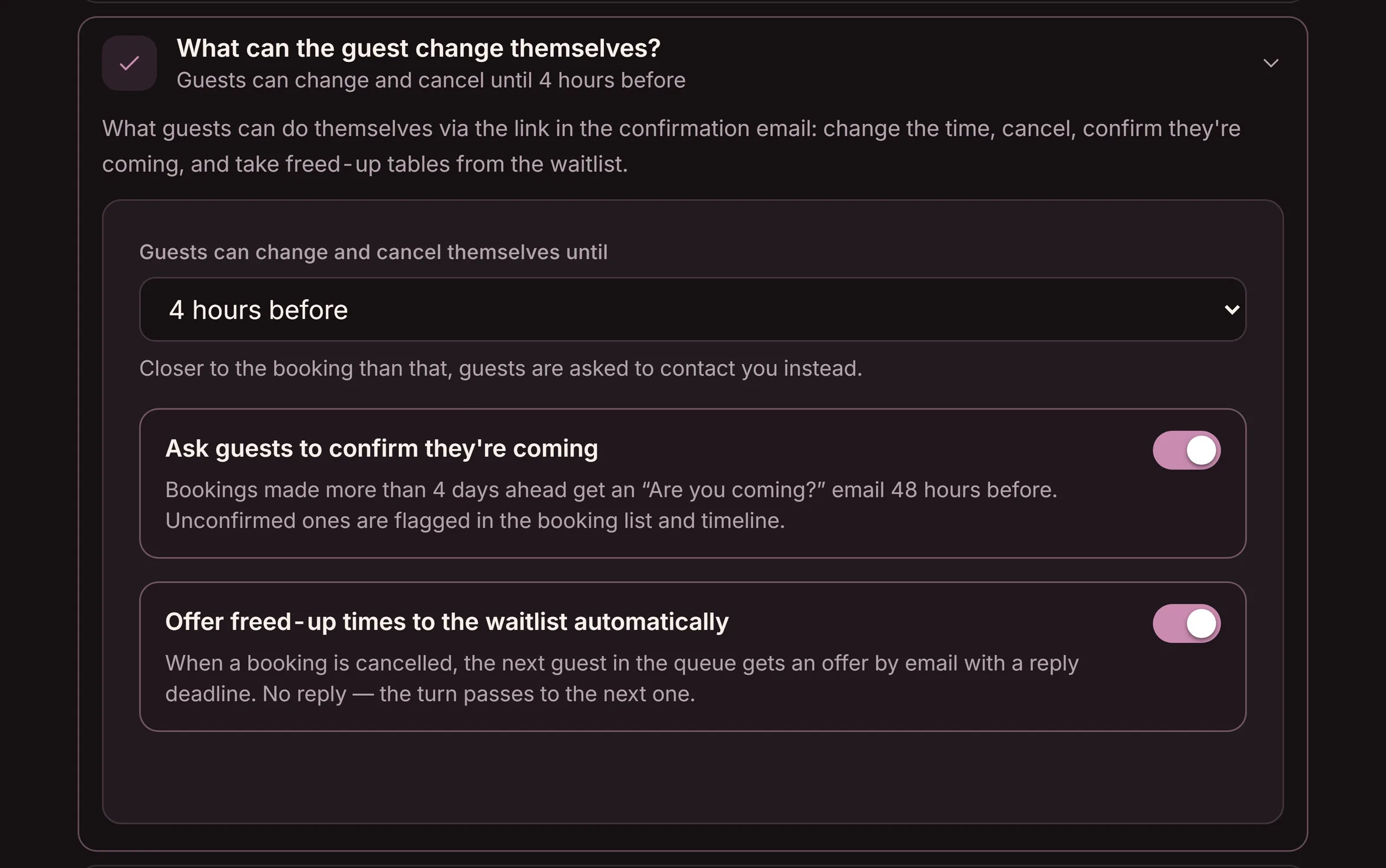
Make it easy to cancel in time
A policy only works if the guest can follow it without picking up the phone. Right on the confirmation screen — and in every confirmation — there's a link where the guest changes the time, the party size, or cancels on their own, up to the window you set. Reminders go by email (free), and for reservations made well in advance you can send a re-confirmation, a "still coming?" message.
- A Manage your reservation link right on the confirmation
- Reminders by email — plus a re-confirmation if you switch it on
- The guest doesn't have to call mid-lunch, and you don't take the call
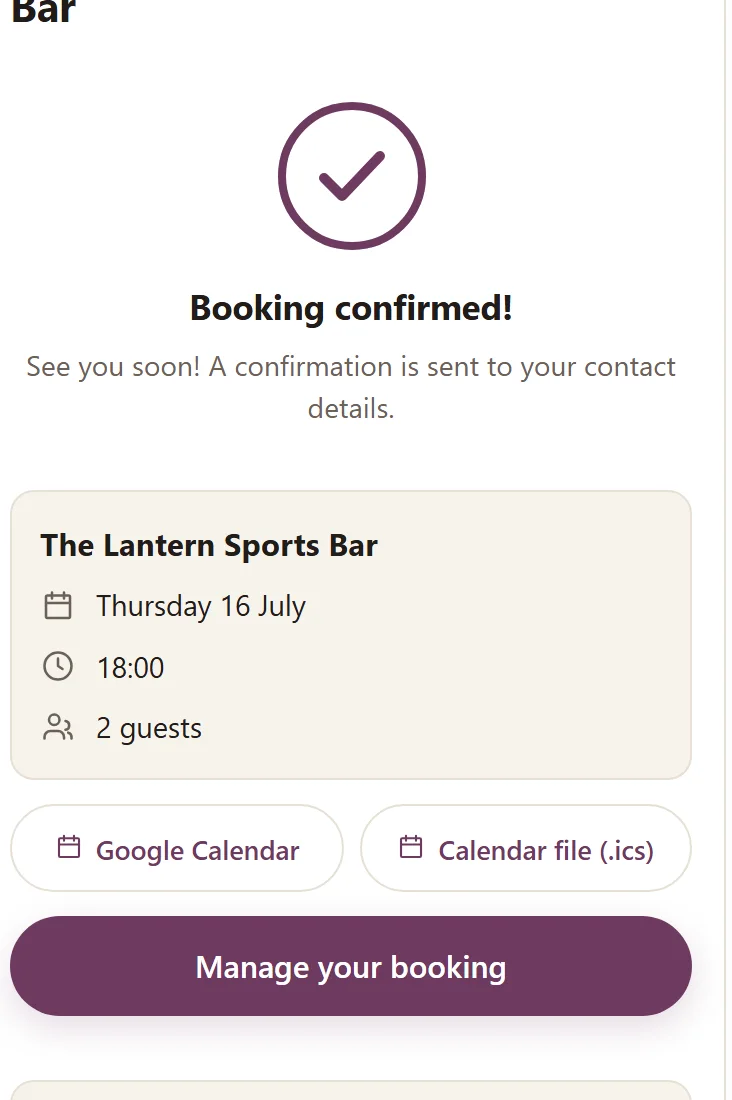
Want to go further? Aim the card cover at the risk reservations
You don't need a deposit on every reservation — it scares off weekday guests. Goboblo's no-show cover is a card cover instead: the guest saves a card when booking, nothing is charged when the reservation is made, and you can take a per-guest fee only if the party doesn't arrive and doesn't cancel. You aim it at large parties and can always require a card from guests who have no-showed before — regulars are spared.
- Nothing charged up front — a fee only on a no-show
- Applies to parties from a size you choose yourself
- Paid out straight to you — no fee from Goboblo
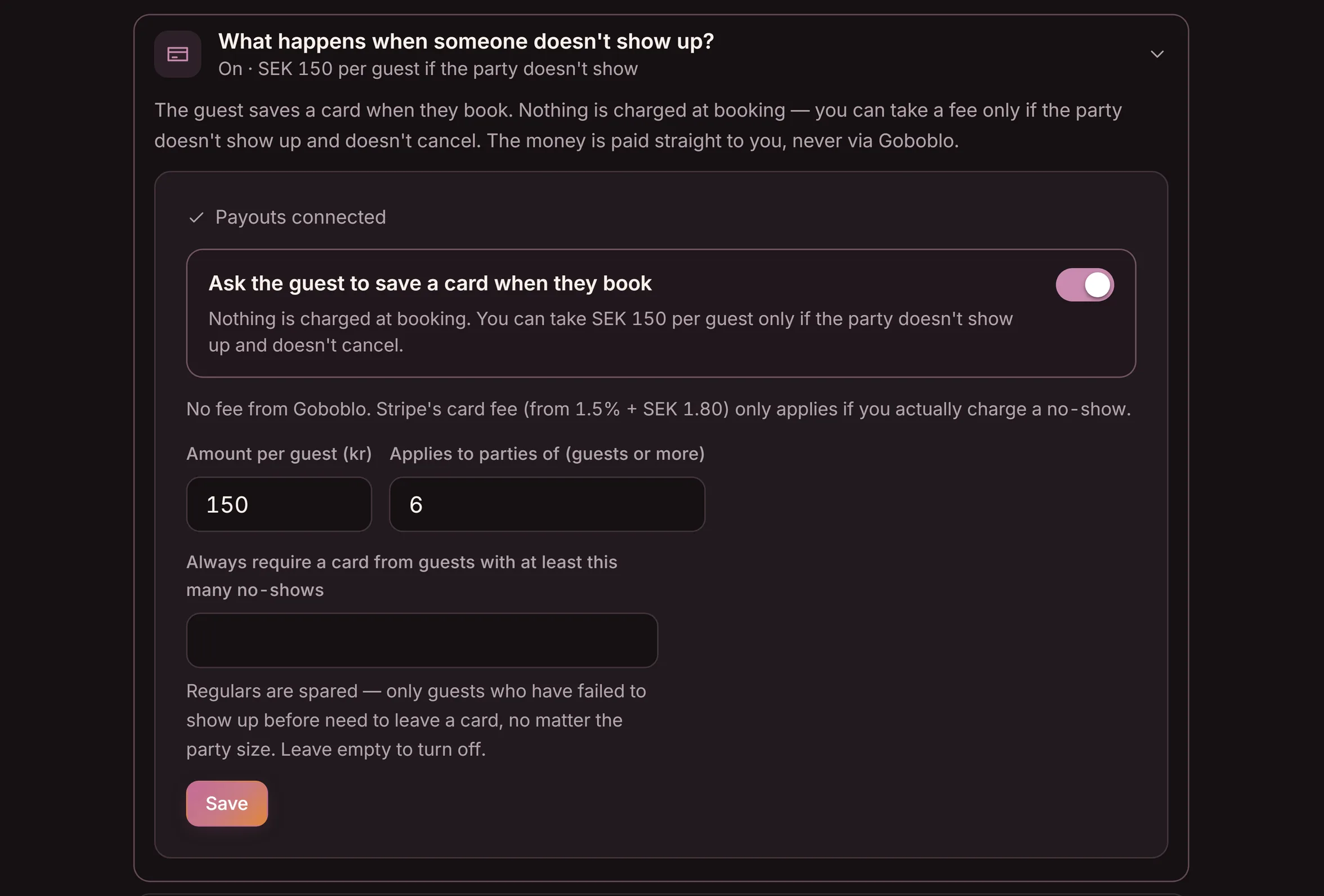
Fill the canceled table — and see the patterns
When a guest cancels, the time can be offered to the next guest on the waitlist by email. A loss becomes a new reservation instead of an empty table. Every guest also has a no-show score on their profile, so you can see who tends to miss reservations and take it into account next time.
- A canceled time is offered to the next guest on the waitlist, if you switch it on
- A no-show score on the guest profile flags repeat offenders
- Every move is a setting you choose per location
Which restaurants need a policy?
A cancellation policy matters as soon as you take reservations ahead of time. If you only take walk-ins, you don't need one. It's especially important for four kinds of business.
- Fine dining and à la carte nights. Long prep and a limited number of tables make every missed party expensive. A longer window fits here.
- Lunch restaurants with a hard rush. Lots of reservations in a short window. A short window is enough, but it has to be clear.
- Bars and sports bars on high-demand nights. Packed some nights, quiet others. A policy helps you fill the nights people want.
- Restaurants that take large parties. A missed table of ten is a big loss. Set separate terms for larger groups.
Without a policy and with a clear one
Without a policy the guest doesn't know whether canceling is fine, how to do it, or when it's too late — which makes it easier to just not turn up. A clear policy gives the guest a simple way to tell you in time.
- No window — the guest doesn't know when it's too late
- The only way to cancel is to call during the rush
- Late cancellations become quiet missed tables
- The same vague rule for lunch and for a tasting menu
- A clear cancellation window, set per location
- The guest changes or cancels via the link in the confirmation
- Your team fills the canceled table from the waitlist
- A no-show score shows the patterns over time
How Goboblo makes it easier
Goboblo is a restaurant reservation software where the cancellation policy is built into the reservation itself. You set the window per location, the guest changes or cancels on their own via the link in the confirmation, the re-confirmation reminds them in time by email, and a canceled time is emailed to the next guest on the waitlist if you switch that on. The guest profile's no-show score shows the patterns over time — so you can tell a no-show from a cancellation in time.
You don't need a deposit on every reservation to protect your tables — for most restaurants a clear window, a reminder and a waitlist go a long way. To go further there's the card cover: nothing charged up front, a fee only if the party doesn't arrive and doesn't cancel, aimed at large parties and repeat no-showers. The full toolbox is in the guide on reduce restaurant no-shows. Want to see how it looks for your restaurant? See pricing or book a demo, and we'll set up your cancellation window and policy together.
What operators ask about cancellation policies
What is a restaurant cancellation policy?
It's the set of rules for how and when a guest can cancel without leaving the restaurant with an empty table. The policy says how far ahead the guest can cancel on their own, what happens with a late cancellation, and what counts as a missed reservation.
How long should the cancellation window be?
It depends on the restaurant. Lunch and weeknights often get by with a few hours. Fine dining, tasting menus and large parties need a day or two, because food is bought in and staff is planned ahead. In Goboblo you set the window per location.
Do I have to take a deposit?
No — for most restaurants a clear window, a reminder and a waitlist go a long way. If you want to go further, Goboblo has a no-show cover: the guest saves a card when booking, nothing is charged when the reservation is made, and you can take a per-guest fee only if the party doesn't arrive and doesn't cancel. You aim it at large parties and can always require a card from guests who have no-showed before — regulars are spared.
How does the guest cancel?
In Goboblo there's a link in every confirmation where the guest changes the time, party size, or cancels on their own up to the window you set. The guest doesn't have to call, and you don't have to take the call mid-service.
What's the difference between a cancellation and a no-show?
A cancellation is when the guest tells you in time, so you can sell the table again. A no-show is when the guest neither arrives nor cancels, so the table sits empty. The point of the policy is to get more cancellations and fewer no-shows.
Want to set a cancellation policy for your restaurant?
Book a short demo and we'll show the cancellation window per location, guest self-service and the waitlist in a real restaurant flow.